
How a Two-Line Error Cost Me Half an Hour
Yesterday I just wanted to quickly install some ComfyUI skills for Claude Code. Should’ve been a ten-second job: /plugin marketplace add Comfy-Org/comfy-skills, hit enter, done.
It wasn’t.
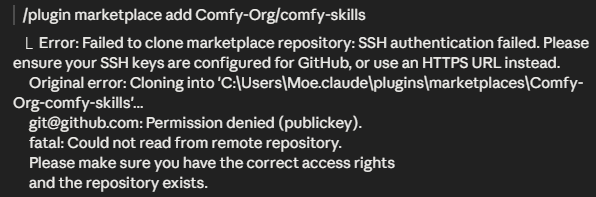
I got this:
git@github.com: Permission denied (publickey).fatal: Could not read from remote repository
First attempt, first error: SSH authentication failed, “Permission denied (publickey)”. Fair enough — no SSH key set up for GitHub. So I typed out the HTTPS URL directly instead of the shorthand.
Second attempt, second error, and this one was more annoying: “SSL certificate problem: unable to get local issuer certificate”. Git no longer trusted the certificate chain.
On a company laptop, that’s a pretty classic symptom. The company inspects internet traffic and inserts its own certificate into the HTTPS connection — completely normal, and usually necessary. The catch: Git for Windows ships with its own small list of trusted certificate authorities and doesn’t know about the company’s certificate. Windows itself usually does know about it, because IT registered it there when setting up the machine. Git just doesn’t check that store by default.
The fix turned out to be a single command:
git config --global http.sslbackend schannelThat tells Git: don’t use your own certificate list, use Windows’ instead. And since the company certificate is already trusted there, the connection works right away.
Right after that, the marketplace import went through without a hitch.
What I’m taking away from this: when HTTPS clones fail with certificate errors on a company machine, it’s usually not the network that’s broken, and it’s not GitHub either Git is just looking in the wrong certificate drawer. A quick check of http.sslbackend can save you a lot of frustration.